 c70929bf2c
*Total -- 967.49kb -> 703.99kb (27.24%) /docs/images/radio.png -- 5.29kb -> 1.58kb (70.18%) /docs/images/text_input.png -- 3.18kb -> 1.27kb (60.17%) /docs/images/checkbox.png -- 5.56kb -> 2.22kb (60.17%) /examples/color_palette/screenshot.png -- 102.74kb -> 43.75kb (57.42%) /examples/tour/images/ferris.png -- 32.29kb -> 15.91kb (50.73%) /docs/graphs/ecosystem.png -- 124.13kb -> 67.44kb (45.67%) /docs/graphs/iced.png -- 97.75kb -> 53.27kb (45.5%) /docs/graphs/native.png -- 57.90kb -> 33.67kb (41.85%) /docs/images/text.png -- 4.95kb -> 2.99kb (39.61%) /docs/graphs/foundations.png -- 18.19kb -> 11.19kb (38.46%) /examples/scrollable/screenshot.png -- 144.78kb -> 102.53kb (29.18%) /examples/svg/resources/tiger.svg -- 67.02kb -> 64.50kb (3.76%) /docs/logo.svg -- 1.37kb -> 1.35kb (1.57%) /docs/images/todos_desktop.jpg -- 302.36kb -> 302.33kb (0.01%) Signed-off-by: ImgBotApp <ImgBotHelp@gmail.com> |
||
|---|---|---|
| .github | ||
| core | ||
| docs | ||
| examples | ||
| futures | ||
| glow | ||
| glutin | ||
| graphics | ||
| lazy | ||
| native | ||
| src | ||
| style | ||
| wgpu | ||
| winit | ||
| .gitignore | ||
| Cargo.toml | ||
| CHANGELOG.md | ||
| CONTRIBUTING.md | ||
| Cross.toml | ||
| ECOSYSTEM.md | ||
| LICENSE | ||
| README.md | ||
| ROADMAP.md | ||
| rustfmt.toml | ||








Features
- Simple, easy-to-use, batteries-included API
- Type-safe, reactive programming model
- Cross-platform support (Windows, macOS, Linux, and the Web)
- Responsive layout
- Built-in widgets (including text inputs, scrollables, and more!)
- Custom widget support (create your own!)
- Debug overlay with performance metrics
- First-class support for async actions (use futures!)
- Modular ecosystem split into reusable parts:
- A renderer-agnostic native runtime enabling integration with existing systems
- Two built-in renderers leveraging
wgpuandglow - A windowing shell
- A web runtime leveraging the DOM
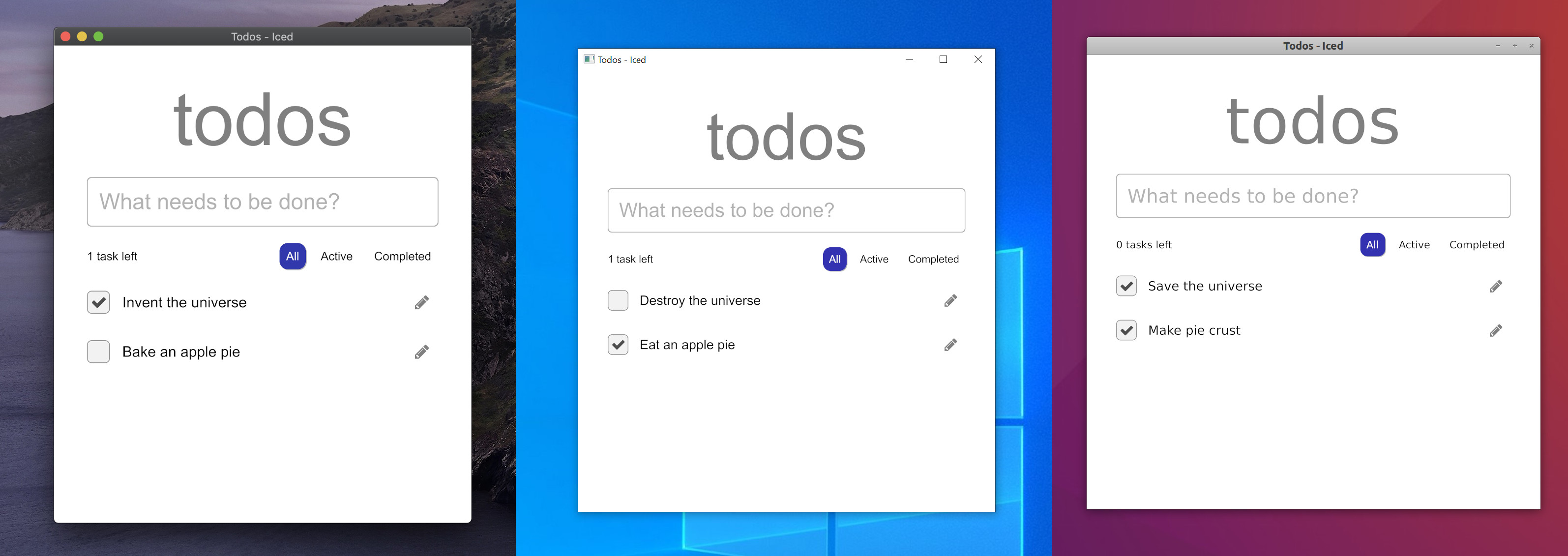
iced is currently experimental software. Take a look at the roadmap, check out the issues, and feel free to contribute!
Installation
Add iced as a dependency in your Cargo.toml:
iced = "0.3"
iced moves fast and the master branch can contain breaking changes! If
you want to learn about a specific release, check out the release list.
Overview
Inspired by The Elm Architecture, iced expects you to split user interfaces into four different concepts:
- State — the state of your application
- Messages — user interactions or meaningful events that you care about
- View logic — a way to display your state as widgets that may produce messages on user interaction
- Update logic — a way to react to messages and update your state
We can build something to see how this works! Let's say we want a simple counter that can be incremented and decremented using two buttons.
We start by modelling the state of our application:
use iced::button;

struct Counter {
    // The counter value
    value: i32,

    // The local state of the two buttons
    increment_button: button::State,
    decrement_button: button::State,
}
Next, we need to define the possible user interactions of our counter: the button presses. These interactions are our messages:
#[derive(Debug, Clone, Copy)]
pub enum Message {
    IncrementPressed,
    DecrementPressed,
}
Now, let's show the actual counter by putting it all together in our view logic:
use iced::{Button, Column, Text};

impl Counter {
    pub fn view(&mut self) -> Column<Message> {
        // We use a column: a simple vertical layout
        Column::new()
            .push(
                // The increment button. We tell it to produce an
                // `IncrementPressed` message when pressed
                Button::new(&mut self.increment_button, Text::new("+"))
                    .on_press(Message::IncrementPressed),
            )
            .push(
                // We show the value of the counter here
                Text::new(self.value.to_string()).size(50),
            )
            .push(
                // The decrement button. We tell it to produce a
                // `DecrementPressed` message when pressed
                Button::new(&mut self.decrement_button, Text::new("-"))
                    .on_press(Message::DecrementPressed),
            )
    }
}
Finally, we need to be able to react to any produced messages and change our state accordingly in our update logic:
impl Counter {
    // ...

    pub fn update(&mut self, message: Message) {
        match message {
            Message::IncrementPressed => {
                self.value += 1;
            }
            Message::DecrementPressed => {
                self.value -= 1;
            }
        }
    }
}
And that's everything! We just wrote a whole user interface. iced is now able to:
- Take the result of our view logic and layout its widgets.
- Process events from our system and produce messages for our update logic.
- Draw the resulting user interface.
Browse the documentation and the examples to learn more!
Implementation details
iced was originally born as an attempt at bringing the simplicity of Elm and The Elm Architecture into Coffee, a 2D game engine I am working on.
The core of the library was implemented during May 2019 in this pull request.
The first alpha version was eventually released as
a renderer-agnostic GUI library. The library did not provide a renderer and
implemented the current tour example on top of ggez, a game library.
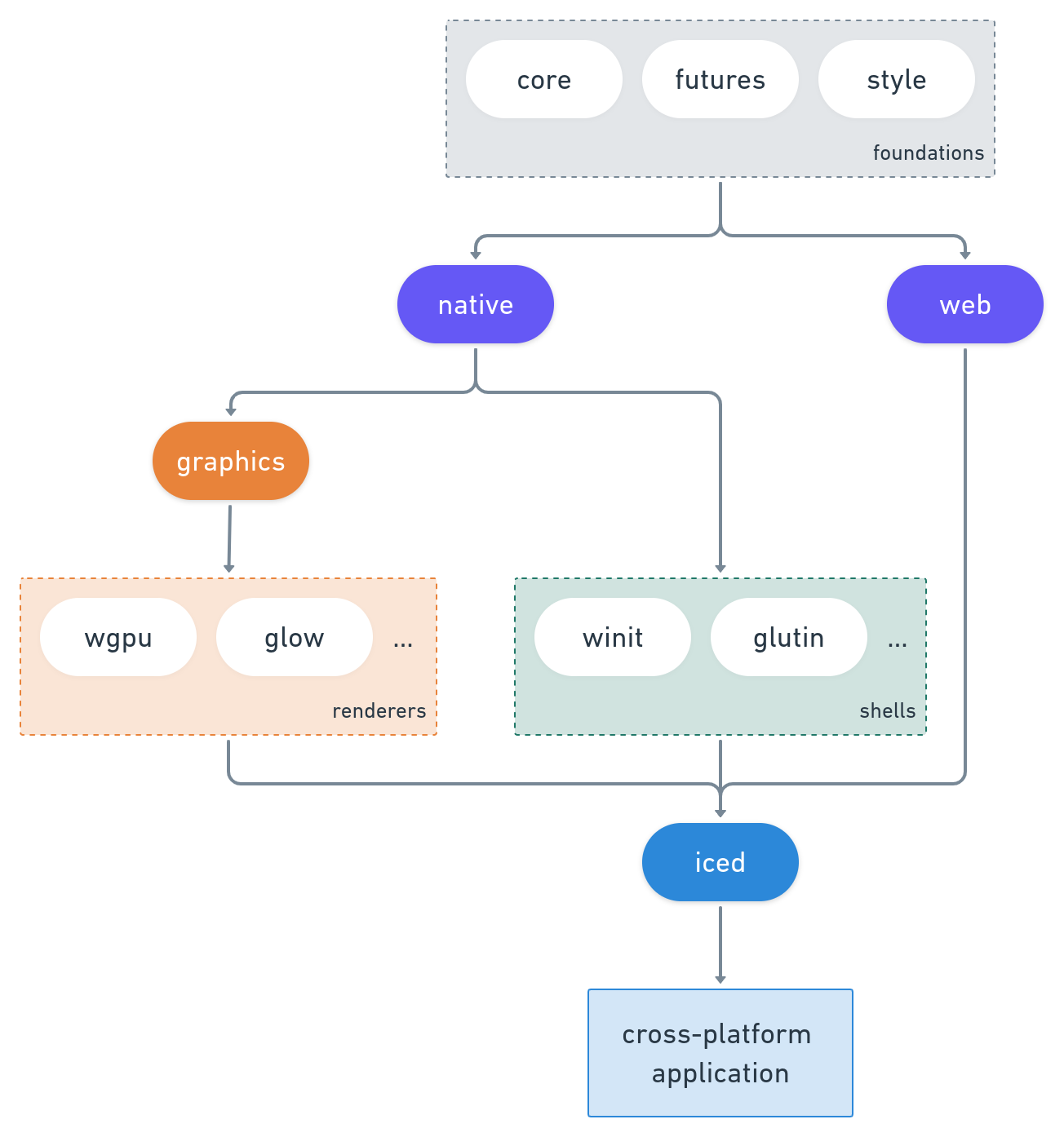
Since then, the focus has shifted towards providing a batteries-included, end-user-oriented GUI library, while keeping the ecosystem modular:
Common problems
-
Error: GraphicsAdapterNotFoundThis occurs when the selected built-in renderer is not able to create a context.
Often this will occur while using
iced_wgpuas the renderer without supported hardware (needs Vulkan, Metal or DX12). In this case, you could try using theiced_glowrenderer:First, check if it works with
$ cargo run --features "iced/glow iced/glow_canvas" --package game_of_lifeand then use it in your project with
iced = { version = "0.3", default-features = false, features = ["glow"] }NOTE: Chances are you have hardware that supports at least OpenGL 2.1 or OpenGL ES 2.0, but if you don't, right now there's no software fallback, so it means your hardware doesn't support Iced.
Contributing / Feedback
Contributions are greatly appreciated! If you want to contribute, please read our contributing guidelines for more details.
Feedback is also welcome! You can open an issue or, if you want to talk,
come chat to our Discord server. Moreover, you can find me (and a bunch of
awesome folks) over the #games-and-graphics and #gui-and-ui channels in
the Rust Community Discord. I go by lone_scientist#9554 there.
Sponsors
The development of iced is sponsored by the Cryptowatch team at Kraken.com